Video editing often takes longer than expected because the hardest part is not always the creative decision. It is everything that happens around it.
An editor may spend hours reviewing duplicate takes, finding a usable line in a long interview, removing pauses, syncing camera angles, preparing different versions, and making small changes across multiple deliverables. These tasks are necessary, but they can consume time that would otherwise go into story, pacing, and visual decisions.
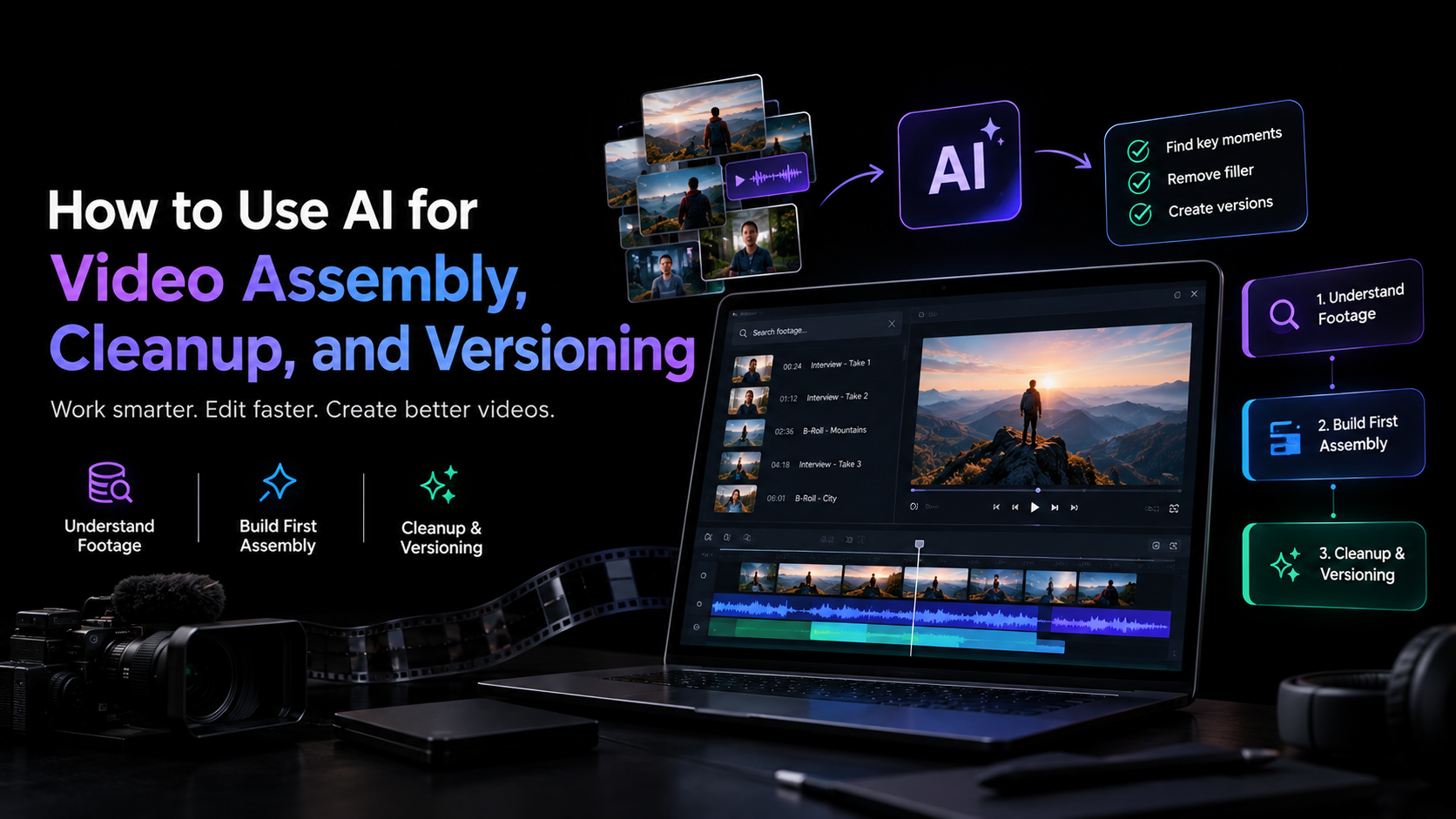
AI can help by taking on parts of that execution. The most useful workflows do not ask AI to replace the editor. Instead, they use it to understand footage, assemble a starting point, clean up repetitive material, and create variations that the editor can inspect and refine.
This guide explains how to use AI across those three stages and where human judgment should remain central.
Table of Contents
Start With Footage Understanding
Before AI can assemble an edit, it needs to make sense of the material.
A typical project might contain several takes of the same scene, hours of interview footage, B-roll, music, multiple camera angles, or generated and existing media. Manually reviewing everything is often one of the most time-consuming parts of post-production.
AI-assisted editing can reduce this initial workload by making footage searchable and easier to navigate.
Instead of scrubbing through a long recording, an editor can search for a specific person, scene, action, topic, or moment using natural language. For dialogue-heavy projects, transcripts can also make it easier to locate specific statements and compare different sections of a recording.
This does not mean every AI-selected clip should automatically make the final cut. The goal is to shorten the distance between a large media pool and the material worth reviewing.
Use AI to Build the First Assembly
The first assembly is where AI can take on a substantial amount of repetitive work.
A base cut is the first complete version of a timeline assembled from usable footage. It is not a highlights reel or a finished edit. It gives the editor a coherent starting point that can be reviewed and shaped further.
A practical AI video assembly workflow looks like this:
- Import the footage. Bring the available camera files, audio, B-roll, music, and other media into the project.
- Add context. Provide a script, transcript, shooting structure, or clear editorial direction when available.
- Describe the desired edit. Explain what the first assembly should accomplish, such as keeping each talking point once and removing repeated takes.
- Review the timeline. Check the selected takes, pacing, transitions, and overall story.
- Refine manually or with further instructions. Treat the AI-generated assembly as an editable starting point rather than a final delivery.
This is where in video editor can help, bringing an agentic video editing platform into an AI-assisted editing workflow. Its AI editing agents can work directly with uploaded footage and an editable timeline. An agent can review source material, select usable takes, remove repetition, and assemble a base cut based on the direction provided.
The workflow can accommodate different types of projects. A scripted single-camera recording can be assembled around the script, while unscripted footage can be organized around the points discussed. Multicam material can be synchronized and assembled into a layered cut.
The important part is that the result remains inside the editing project. With invideo editor, the editor can inspect the assembled timeline, replace selections, change pacing, and continue refining the cut rather than treating the AI output as a finished file.
Use AI for Cleanup, Not Creative Judgment
Once the first assembly exists, cleanup becomes the next opportunity for automation.
Cleanup can include removing false starts, repeated sentences, long pauses, filler words, unusable takes, or sections that do not contribute to the sequence. AI can identify many of these patterns faster than a person reviewing footage from beginning to end.
But cleanup is not purely mechanical.
A pause might be unnecessary in one interview and essential in another. A repeated sentence might sound better than the technically cleaner take. A slightly imperfect performance may carry more character than a polished replacement.
For that reason, AI cleanup works best when it gives the editor a cleaner starting point rather than making irreversible editorial decisions.
Keep the Timeline Editable
The difference between useful automation and frustrating automation often comes down to control.
If AI removes something, the editor should be able to inspect the decision and change it. If it selects one take, there should be a way to replace that take. If it changes the pacing, the editor should still be able to adjust the timing.
This is particularly important for professional projects where the edit may go through several rounds of review.
Invideo editor takes this timeline-based approach by keeping the agent’s work inside the project. Editors can continue working manually after an agent completes its assigned task, which makes AI assistance part of the editing process rather than a separate generation step.
Improve the Picture and Sound After Assembly
AI can also assist with technical cleanup once the structure is in place.
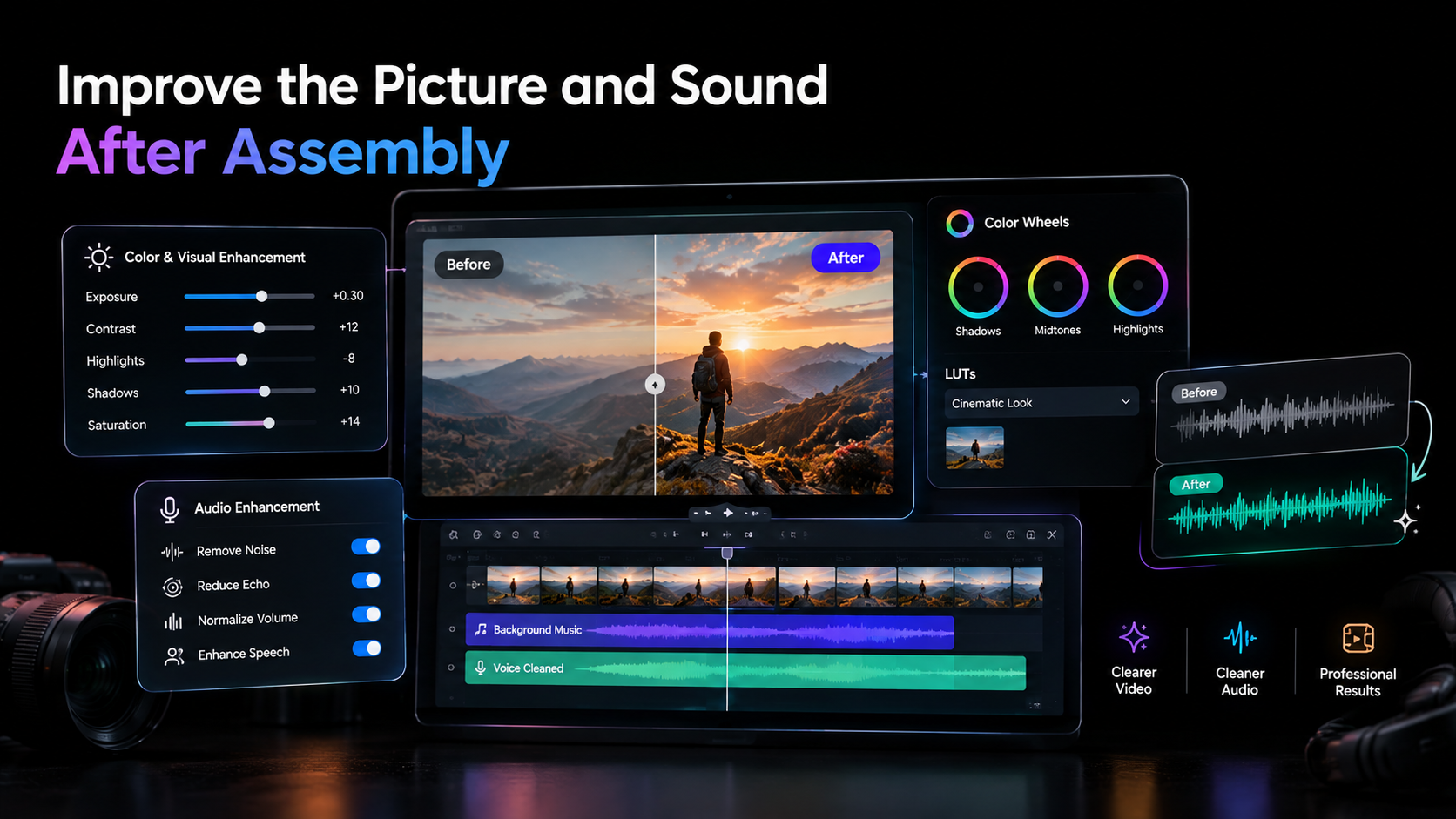
Audio workflows may include dialogue cleanup, sound effects, mixing, and mastering. Visual finishing can involve exposure correction, colour balancing, matching shots, and creating a consistent look across a sequence.
For example, an editor working with footage recorded under slightly different lighting conditions may need to correct temperature, tint, exposure, contrast, saturation, and highlights and shadows before final delivery.
An AI-assisted workflow can start with a plain-language instruction. An editor might describe a warmer, softer look or provide a reference image, then refine the result manually using colour wheels, curves, LUTs, or other controls.
Invideo editor supports this combination of AI direction and manual control. An editor can describe the desired treatment to an editing agent or provide a reference image, then refine the grade using controls such as Lift, Gamma, Gain, exposure, contrast, temperature, tint, saturation, RGB curves, and hue-based curves.
This can be particularly useful when several shots need a consistent visual treatment. The AI can help establish the direction, while the editor decides how the final footage should look.
Create Multiple Versions From One Edit
Versioning is another area where AI can save repetitive work.
A single master video may need several deliverables:
- A full-length version for YouTube or a website
- Short highlights for social platforms
- A trailer or teaser
- Vertical and square versions
- Different cuts for specific audiences
- Localized versions with translated dialogue or dubbing
Creating these manually can mean returning to the same timeline repeatedly.
Instead, treat the master edit as the source and define what each version needs to accomplish. AI can then help identify sections, adjust durations, rearrange sequences, or prepare different cuts.
With video editor, AI agents can be used alongside the timeline to restructure sequences and prepare different versions from an existing project. The editor can then review each variation and make manual adjustments where the automated result does not fit the intended platform or audience.
The editor still needs to review each version. A section that works in a 16:9 interview may not work when cropped vertically. A line that makes sense in the full video may need additional context when used as a short clip.
AI speeds up the production of alternatives, but the editorial check remains important.
Use AI for Localization and Cutdowns
Versioning is not limited to aspect ratios and duration.
For organizations publishing content across regions, localization can involve translating dialogue, dubbing, and maintaining lip sync. For content teams, the same source material may also need different introductions, calls to action, or supporting visuals.
AI can help turn one approved edit into several localized or audience-specific versions without requiring the editor to rebuild everything from the beginning.
The same principle applies to cutdowns. Instead of manually searching the master timeline for every possible highlight, AI can identify relevant sections based on a topic or instruction. The editor can then decide which suggestions actually work as standalone pieces.
Invideo editor also brings cutdowns and versioning into the same project workflow, which can be useful when the goal is to maintain one source edit while developing trailers, highlights, social cuts, or other deliverables.
Build a Human-in-the-Loop Workflow
The most practical way to use AI for video editing is to divide the work according to what requires judgment and what requires repetition.
Let AI handle repetitive execution
AI is well suited to tasks such as:
- Reviewing large amounts of footage
- Finding specific moments
- Comparing and organizing takes
- Removing obvious repetition and filler
- Creating an initial assembly
- Preparing alternate cuts
- Supporting localization
- Applying repeatable technical adjustments
Keep Creative Decisions With the Editor
The editor should still determine:
- Which performance communicates the story best
- Where the pacing should change
- What emotional beat deserves more time
- Which visual takes priority
- Whether a cut feels natural
- What the final sequence should communicate
This division makes AI a practical part of the editing process rather than a replacement for editorial craft.
A Practical AI Editing Workflow
For a project starting with several hours of raw footage, the process can be straightforward.
First, organize the source material. Bring footage and supporting media into the project and provide any script or transcript available.
Next, create the first assembly. Give the AI clear instructions about the story, structure, usable takes, and material that should be removed.
Then, review the timeline. Look for incorrect selections, awkward transitions, missing context, or pacing issues. Replace or rearrange anything that does not work.
After that, clean up the edit. Remove remaining filler, improve dialogue, correct visual inconsistencies, and refine the sequence. If the project needs a specific visual treatment, use AI direction or reference images as a starting point for colour work, then make precise manual adjustments.
Finally, create versions. Use the approved edit as the source for shorter cuts, alternate formats, localized versions, or platform-specific deliverables.
The key is to review between stages instead of allowing AI to run through the entire process without supervision.
Final Takeaway
AI is most useful in video editing when it reduces repetitive execution without removing the editor from the process.
Assembly, footage search, cleanup, colour adjustments, localization, and versioning all contain tasks that can be accelerated with AI. But the final edit still depends on decisions about story, performance, pacing, tone, and context.
Tools such as video editor show how AI editing agents can work within an editable timeline, helping with footage review, assembly, cleanup, finishing, and versions while leaving the project open to manual refinement.
A good AI editing workflow therefore looks less like handing over an entire project and more like assigning specific jobs to an assistant. Let the system work through the material, build a starting timeline, handle repeatable tasks, and prepare variations. Then use the editable project to review, redirect, and make the creative decisions that determine the finished video.

Bodh Raj is a Digital Marketing Manager with around 5 years of experience in SEO, content marketing, Meta Ads, Google Ads, and digital growth strategies. He has worked on website optimization, content planning, lead generation, and online marketing campaigns across different industries, helping businesses improve their digital presence and organic visibility.