Table of Contents
Google Ads is not just about keyword selection, crafting ads, and budgeting. Accurate tracking is necessary for a campaign to determine what happens after someone clicks an ad. One user can click on an ad and exit the site. Someone else can read the page, complete a form, make a phone call or purchase a product.
Without measurement, it’s hard to determine if the campaign is getting results. This is why both campaign creation and conversion tracking should be covered by a Google Ads Course. By working through the campaign itself, learners will grasp how keywords, ads, landing pages, conversions and reports all function together.
Why Conversion Tracking Matters in Google Ads
Now suppose a coaching institute is running Google Search Ads for a Digital marketing course. The campaign has reached 1000 clicks per week. While that number sounds good, clicks don’t tell the whole story. The institute also needs to know what visitors did after reaching the website.
For example:
- 1,000 people clicked the ads
- 700 visited the course page
- 80 started the enquiry form
- 35 submitted the form
- 12 people called the institute
Now the business has more useful information. The same process applies to e-commerce stores, real estate companies, hospitals, travel businesses, and service providers. The main conversion will be different for each business. It could be a purchase, enquiry, phone call, booking, or sign-up.
A good Google Ads Course should explain how to identify these actions and track them properly.
From Search to Conversion
Consider someone searching for “best digital marketing course.” The person sees a relevant ad and clicks it. The ad takes them to a course page where they can learn more and submit an enquiry.
The journey is simple:
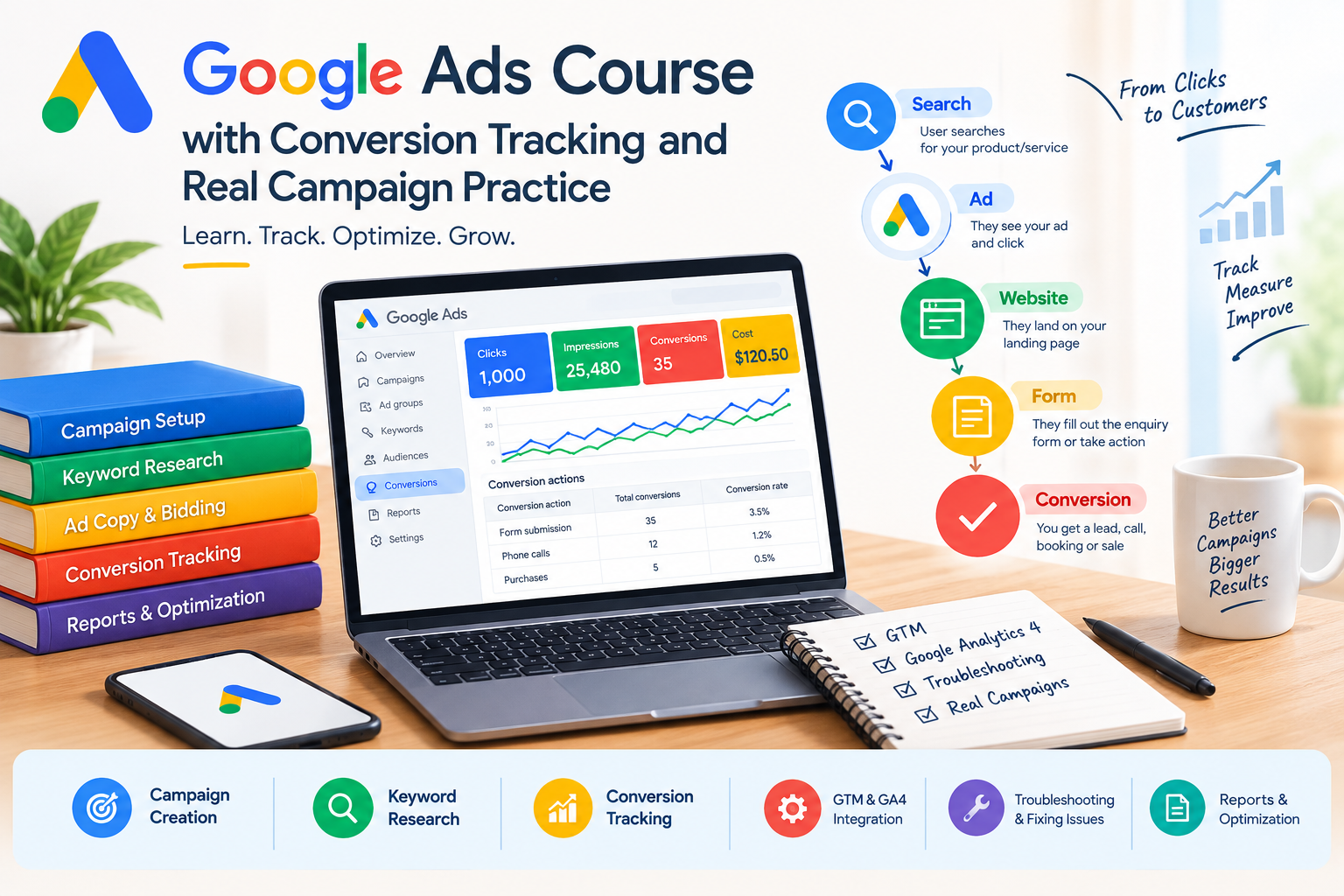
Search → Ad → Website → Form → Conversion
Each step matters.
The keyword decides which searches may show the ad. The ad should match the search. The landing page should give users the information they expected. If the user submits a form, that action should be tracked when it is an important business goal. This shows why Google Ads should not be learned as a collection of separate dashboard options.
What Should a Google Ads Course Teach?
The first step in a useful Google Ads Course is to begin with the goal of the campaign. If your business is searching for sales, you will require a different approach than if you’re seeking phone calls or leads. The next step is keyword research. Learners should be able to comprehend search intent and locate keywords that are relevant to the business. These relevant keywords can then be sorted into appropriate ad groups.
Negative keywords can also play an important role in minimizing unnecessary traffic. The next step is to write ads. The message should be clear, relevant, and related to the landing page.
Bidding, budgets, conversion tracking, reporting and optimisation should then be covered in training. These skills will help learners gain a deeper understanding of PPC campaign management.
How Conversion Tracking Works
Conversion tracking might sound like a technical thing, but it’s quite simple to understand.
1. Choose the Action
The first step is to determine what the business is looking to measure. It may be a purchase, enquiry form, phone call, booking or any other useful action.
2. Choose the Source
The conversion may happen on a website, inside an app, through a phone call, or through another supported source.
3. Create the Conversion
The selected action is added as a conversion in Google Ads with the required settings.
4. Add Tracking
The tracking can be done via the Google tag, Google Tag Manager, Google Analytics or other supported tracking methods, depending on the setup.
5. Test It
Before using the data, it’s necessary to test it. A test action may be useful to verify the tracking setup.
6. Check the Data
Once the campaign has begun, the conversion activity should be monitored regularly. If the numbers are not as they would be expected, the tracking setup should be checked again.
Why Google Ads Practical Training Is Important
It’s easy to learn about conversion tracking, but it’s much harder to actually solve tracking issues. Suppose a campaign gets plenty of clicks but no form submissions appear in Google Ads. There could be several reasons.
The tag may not be firing. The form may have changed. A trigger may be incorrect. The conversion could have been set up wrongly. Duplicate conversions can also be noted in some instances.
A hands-on Google Ads Course can provide students an opportunity to practice these scenarios. They can verify the conversion settings, access Google Tag Manager preview, submit a test form, and verify if the event is captured. This will help students understand what conversion tracking is, but also how to troubleshoot it when they run into an issue.
Primary and Secondary Conversions
Not every tracked action has the same value. Primary conversions can be used for campaign optimisation when they are included as goals for bidding. Secondary conversions are generally useful for observation and reporting.
For example, a service website may track:
- Enquiry form submissions
- Brochure downloads
A request for information could be more valuable than a brochure download for the business. If so, the enquiry can be considered the primary conversion and the download can be tracked concurrently. This separation allows marketers to not be overwhelmed by treating every action as a significant one.
Understanding Conversion Windows
A conversion window is another setting that learners should know about. It defines the period after an eligible ad interaction during which a conversion can be recorded under the selected measurement settings. For instance, when a conversion window is set to 30 days, an eligible conversion that occurs within 30 days of the ad interaction is linked to the ad interaction.
This is dependent on the business and the right window can vary. If you are purchasing something that is on the budget, then you might make a quick decision. If a customer selects a course, property or high-dollar service, it may take much longer. It is a good idea to know this environment to be able to better interpret conversion reports.
Different Types of Conversions
A website may focus on form submissions or bookings. An online store may track purchases and revenue. A business that depends on calls may need phone conversion tracking. App campaigns are different again. They can record installations or activities within an app.
Measurement can include Google Analytics, Firebase, Google Play, or third-party platforms that are supported. When using in-app events as conversion signals, they must also be properly configured. A practical Google Ads Course should explain these differences instead of presenting every conversion as the same type of setup.
Using Data to Find Campaign Problems
Conversion data can also help identify problems. Imagine one keyword gets many clicks but very few enquiries. Another keyword gets fewer clicks but regularly brings leads.
This should lead to further questions. Is the first keyword too broad? Is the search intent different? Does the landing page match the search? Could there be a tracking issue?
A sudden drop in conversions also needs investigation. The problem may not always be the advertisement. A website form could have stopped working, tracking may have changed, or someone may have edited the conversion settings. This is why marketers should investigate the reason behind a change before making major campaign decisions.
A Practice Project for Beginners
Before working on a real client account, learners can practise with a fictional business.
A simple project could include:
- Choose a campaign goal.
- Research search terms.
- Group related keywords.
- Write relevant ads.
- Add negative keywords.
- Set up a form conversion.
- Add the tracking.
- Test the conversion.
- Review sample campaign data.
- Prepare a basic report.
This gives students a chance to use different skills together. A report should not only show numbers. The learner should also explain what the numbers mean and what needs to be checked next. This kind of project makes Google Ads Course training more practical because learners can see how campaign setup, tracking, and reporting connect.
What to Check Before Choosing a Course
Not every course that has a long syllabus provides enough practical experience.
Before choosing a Google Ads Course, check whether it includes:
- Keyword research
- Search intent
- Campaign structure
- Ad creation
- Bidding and budgeting
- Conversion tracking
- Google Tag Manager
- Google Analytics
- Tracking tests
- Troubleshooting
- Reporting
- Performance analysis
- Real campaign practice
Also, do students seriously try to create a conversion, test it, then explore other business scenarios and analyse campaign data? Practical work can have a significant impact, as students will be able to find out what can happen when it is not working as intended.
Conclusion
Google Ads isn’t just about clicks. The real value comes from understanding what happens after those clicks. Campaign performance is affected by keywords, ads, landing pages, conversion tracking and reporting. Once these parts are linked, marketers will be able to make decisions using real data.
A Google Ads Course that provides conversion tracking and practical campaign work will enable learners to develop these skills gradually. They’re not just learning where they can discover various choices; they can practise setting up campaigns, testing conversions, reading reports and discovering possible problems. The goal is to see and learn the entire process, and apply that understanding to actual campaigns.
Frequently Asked Questions
Which is the best way to implement conversion tracking in Google Ads?
It captures specific customer interactions and links them to specific advertisements based on the tracking configuration. These can be purchases, forms submitted, calls, bookings or signups.
Is it possible to use Google Ads without conversion tracking?
Yes. Ads can be served without any tracked conversions and still count for impressions and clicks. But it’s more difficult to determine if those clicks are driving meaningful business outcomes.
What is the best way to test conversion tracking?
A test action can be done and validated using an appropriate tool like Google Tag Manager Preview. This will help to determine if the tag or event is functioning properly or not.
How long does it take to install conversion tracking?
It doesn’t have to be at a specific time. You can get a simple form, but ecommerce or multiple conversion actions will require more setup and testing.
Are problems with tracking possible to resolve on an existing account?
Yes. The conversion actions, tags, triggers, connected tools and settings can be checked for potential tracking problems.
Why do beginners need to practice before client campaigns?
By having access to practice, a beginner can learn how to configure, track, test and report campaigns without altering a live client account. It also helps them get more at ease with troubleshooting.

Akshit Rana is the Co-Founder of Digimaniac and a performance marketing professional with around 7 years of experience in digital advertising and growth strategies. He specializes in performance marketing, paid campaigns, and helping businesses improve online visibility and lead generation.